¶ Prerequisite
Beberapa bahan yang perlu di persiapkan:
- File sdm.iso
- aplikasi pembuat iso (bisa pake PowerISO atau WinRAR)
- akses ke web ESX
- file ova System Manager
- doa
¶ Persiapan
¶ siapkan file ovf-env.xml
Isi file nya seperti ini:
<?xml version="1.0" encoding="UTF-8"?>

<Environment xmlns="http://schemas.dmtf.org/ovf/environment/1" xmlns:xsi="http://www.w3.org/2001/XMLSchema-instance" xmlns:oe="http://schemas.dmtf.org/ovf/environment/1" xmlns:ve="http://www.vmware.com/schema/ovfenv" oe:id="" ve:vCenterId="">
  <PropertySection>
    <Property oe:key="smgrnetworkclass.ip0" oe:value="172.30.1.110"/>
    <Property oe:key="smgrnetworkclass.netmask" oe:value="255.255.255.0"/>
    <Property oe:key="smgrnetworkclass.gateway" oe:value="172.30.1.1"/>
    <Property oe:key="smgrnetworkclass.dns" oe:value="172.30.1.4"/>
    <Property oe:key="smgrnetworkclass.hostname" oe:value="smgroffice.wahana.com"/>
    <Property oe:key="smgrnetworkclass.ipv6address0" oe:value=""/>
    <Property oe:key="smgrnetworkclass.ipv6prefix0" oe:value="64"/>
    <Property oe:key="smgrnetworkclass.ipv6gateway0" oe:value=""/>
    <Property oe:key="smgrnetworkclass.DefaultSearchList" oe:value="wahana.com"/>
    <Property oe:key="smgrnetworkclass.ntpservers" oe:value="172.30.1.101"/>
    <Property oe:key="smgrnetworkclass.timezone" oe:value="Asia/Jakarta"/>
    <Property oe:key="smgroobmnetworkclass.ip1" oe:value=""/>
    <Property oe:key="smgroobmnetworkclass.netmask1" oe:value=""/>
    <Property oe:key="smgroobmnetworkclass.gateway1" oe:value=""/>
    <Property oe:key="smgroobmnetworkclass.hostname1" oe:value=""/>
    <Property oe:key="smgroobmnetworkclass.ipv6address1" oe:value=""/>
    <Property oe:key="smgroobmnetworkclass.ipv6prefix1" oe:value="64"/>
    <Property oe:key="smgroobmnetworkclass.ipv6gateway1" oe:value=""/>
    <Property oe:key="smgrvfqdnclass.smgrVFQDNHostname" oe:value="ccvmgr"/>
    <Property oe:key="smgrvfqdnclass.smgrVFQDNDomain" oe:value="wahana.com"/>
    <Property oe:key="smgrsnmpclass.username.prefix" oe:value="admin"/>
    <Property oe:key="smgrsnmpclass.authprotocol.password" oe:value="P@ssw0rd"/>
    <Property oe:key="smgrsnmpclass.privprotocol.password" oe:value="P@ssw0rd"/>
    <Property oe:key="smgrcliuserclass.custuser" oe:value="admincli"/>
    <Property oe:key="smgrcliuserclass.custpasswd" oe:value="P@ssw0rd!@34"/>
    <Property oe:key="smgrbackupclass.smgr.BackupDefinition" oe:value="False"/>
    <Property oe:key="smgrbackupclass.backupserverip" oe:value=""/>
    <Property oe:key="smgrbackupclass.backupserver.loginid" oe:value=""/>
    <Property oe:key="smgrbackupclass.backupserver.loginpassword" oe:value=""/>
    <Property oe:key="smgrbackupclass.RemoteBkupDestPath" oe:value="/tmp"/>
    <Property oe:key="smgrbackupclass.TransportProtocol" oe:value="SCP"/>
    <Property oe:key="smgrbackupclass.RepeatType" oe:value="Daily"/>
    <Property oe:key="smgrbackupclass.RepeatFrequency" oe:value="1"/>
    <Property oe:key="smgrbackupclass.Year" oe:value=""/>
    <Property oe:key="smgrbackupclass.Month" oe:value="January"/>
    <Property oe:key="smgrbackupclass.Day" oe:value="1"/>
    <Property oe:key="smgrbackupclass.Hour" oe:value="1"/>
    <Property oe:key="smgrbackupclass.Minutes" oe:value="1"/>
    <Property oe:key="smgrbackupclass.Seconds" oe:value="1"/>
    <Property oe:key="smgreasgclass.EASG_enable" oe:value="1"/>
    <Property oe:key="smgrdiskencryption.data_encryption" oe:value="2"/>
    <Property oe:key="boot_passcode" oe:value=""/>
    <Property oe:key="prompt_passcode_boot_time" oe:value="False"/>
    <Property oe:key="csu_password_hashed" oe:value="$6$JOk4qYgu/ZMLQvcl$yw3PgeQy16YjbmMT3sFq/z1z8T9UqfQ2yLON2UXTRQJzHZ7Jx3vgaQQE0BCQmKyVbbaOGEWU3cWvamXHJX8dU/"/>
    <Property oe:key="Public_Key_Client" oe:value="ssh-rsa AAAAB3NzaC1yc2EAAAADAQABAAAAgQCD0huSDJr5OS0sR4YhCfb3tghhOvx7VklAJs5GSdTj6fvfqDrVlQbiIJKnRD7xopb5jZpCA8tJbismISu3xRaPyvNDCudy2ie0A99PD0cr7UpTqtHtVtOIoDWh/GM8lVbdB1O41UmbkYJ+CzWSDZg3+E8Lj14/Xygf3hVfk6BKVw== SDMClientDESKTOP-CGIRE9H"/>
  </PropertySection>
</Environment>
¶ Set key value property file
| key | value | example |
|---|---|---|
| smgrnetworkclass.ip0 | IP address | 172.30.1.110 |
| smgrnetworkclass.netmask | Netmask | 255.255.255.0 |
| smgrnetworkclass.gateway | Gateway | 172.30.1.1 |
| smgrnetworkclass.dns | DNS Servers | 172.30.1.4 |
| smgrnetworkclass.hostname | FQDN | smgroffice.wahana.com |
| smgrnetworkclass.DefaultSearchList | domain | wahana.com |
| smgrnetworkclass.ntpservers | NTP Servers | 172.30.1.101 |
| smgrnetworkclass.timezone | Time Zone | Asia/Jakarta |
| smgrvfqdnclass.smgrVFQDNHostname | virtual fqdn hostname | vmgr |
| smgrvfqdnclass.smgrVFQDNDomain | virtual fqdn domain neme | wahana.com |
| smgrsnmpclass.username.prefix | user snmp | admin |
| smgrsnmpclass.authprotocol.password | user snmp | P@ssw0rd |
| smgrsnmpclass.privprotocol.password | password snmp | P@ssw0rd |
| smgrcliuserclass.custuser | user admin untuk login ssh/console | admincli |
| smgrcliuserclass.custpasswd | password user admin | P@ssw0rd |
| smgreasgclass.EASG_enable | disable/enable EASG | 1 |
| smgrdiskencryption.data_encryption | disable/enable disk encryption | 2 |
| csu_password_hashed | password root account (P@ssw0rd) | $6$JOk4qYgu/ZMLQvcl$yw3PgeQy16YjbmMT3sFq/z1z8T9UqfQ2yLON2UXTRQJzHZ7Jx3vgaQQE0BCQmKyVbbaOGEWU3cWvamXHJX8dU/ |
untuk virtual fqdn hostname, disarankan menggunakan nama yang mudah dan fix untuk instalasi kedepan nya, misal nya vmgr. untuk domain fqdn hostname harus disamakan dengan domain aslinya.
¶ Eksekusi
Next kita eksekusi, langkah-langkah nya adalah sebagai berikut:
- membuat sdm.iso
- deploy SMGR ova
- power on SMGR
- cek root access
¶ Membuat sdm.iso
- simpan file ovf-env.xml
- gunakan aplikasi yang bisa membuat iso file (misalnya PowerISO)
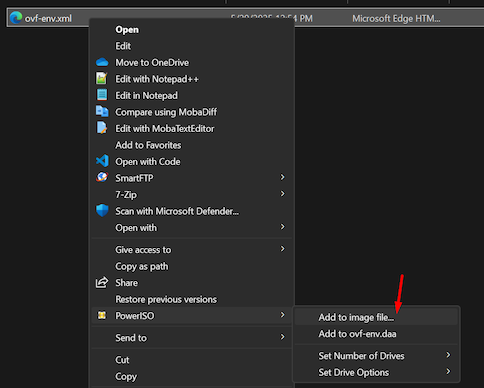
- klik kanan file ovf-env.xml pilih PowerISO, pilih add image to file
- save image file to: pilih .iso file
- klik OK
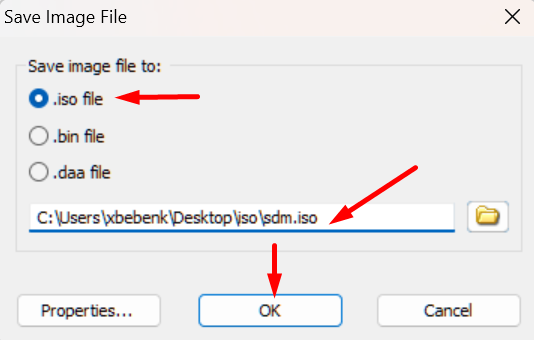
- akan terbentuk file sdm.iso
- klik kanan file ovf-env.xml pilih PowerISO, pilih add image to file
¶ Deploy SMGR OVA
Selanjutnya deploy file ova SMGR dengen menggunakan vpshere client (langsung ke ESX)
disarankan langsung ke ESX, karena deploy langsung di ESX tidak ada wizard yang menanyakan mengenai properti untuk deploy seperti network properties, hostname, domain name, dns, ntp dan lain-lain
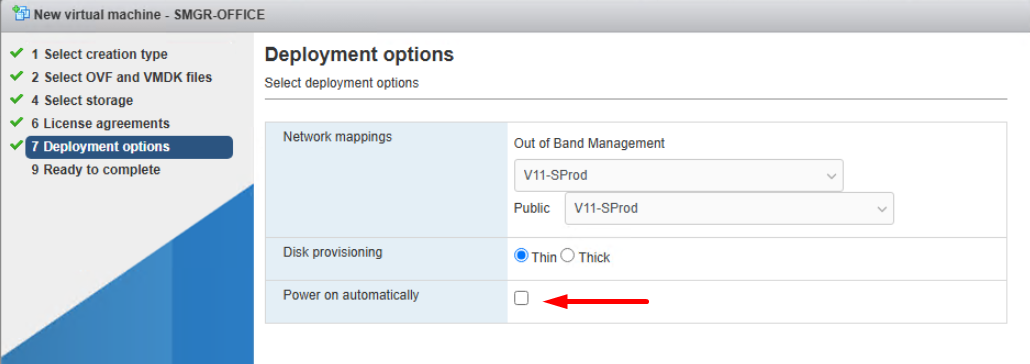
jangan lupa uncheck opsi power on automatically, sebab sebelum power on VM SMGR nya kita mau mount dulu iso sdm yang sebelum nya kita sudah buat.
¶ Power On VM SMGR
sebeleum di power on, edit dulu VM SMGR dan mount file sdm.iso ke VM
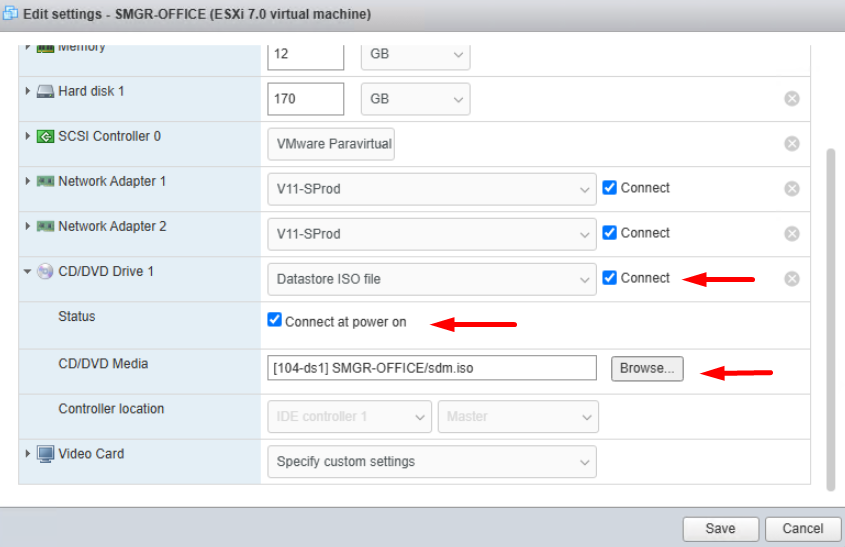
tunggu beberapa saat sampai proses deploy ova selesai
saat pertama kali di power on, SMGR akan mencari file confi di dalam cdrom, sebelumnya kita sudah menentukan value untuk properti yang di butuhkan dalam step pembuatan sdm.iso
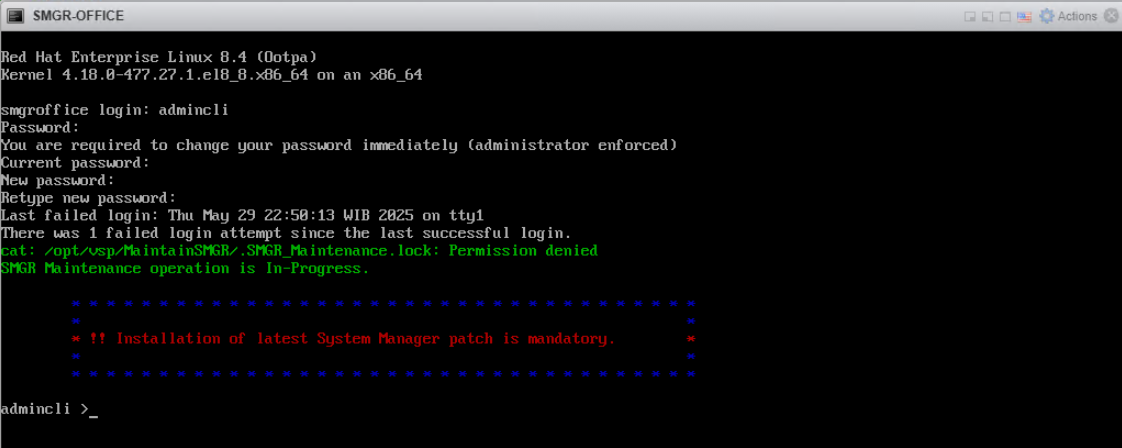
SMGR sudah terinstall dengan properti yang sudah di tentukan dalam file ovf-env.xml yang sebelumnya di buat.
silakan login, dan ganti password admincli dengan yang baru.
default password yang kita gunakan dalam test saat ini adalah:
user: admincli
pass: P@ssw0rd!@34ganti passwordnya menjadi misalnya : P@ssw0rd2025!@34
¶ Cek root access
Last login: Fri May 30 07:32:54 WIB 2025 from 172.30.15.36 on pts/0
Last login: Fri May 30 07:32:54 2025 from 172.30.15.36

        * * * * * * * * * * * * * * * * * * * * * * * * * * * * * * * * * * * *
        *                                                                     *
        * !! Installation of latest System Manager patch is mandatory.        *
        *                                                                     *
        * * * * * * * * * * * * * * * * * * * * * * * * * * * * * * * * * * * *

admincli >su
Password:
Last login: Thu May 29 23:05:01 WIB 2025 on pts/0

 * * * * * * * * * * * * * * * * * * * * * * * * * * * * * * * * * * * * * * * * *
 *                                                                               *
 *   WARNING: The password for booting into single user mode is not configured.  *
 *   This needs to be done at the earliest to allow booting into single user     *
 *                 mode for maintenance or emergency in future.                  *
 *                                                                               *
 * * * * * * * * * * * * * * * * * * * * * * * * * * * * * * * * * * * * * * * * *


        * * * * * * * * * * * * * * * * * * * * * * * * * * * * * * * * * * * *
        *                                                                     *
        * !! Installation of latest System Manager patch is mandatory.        *
        *                                                                     *
        * * * * * * * * * * * * * * * * * * * * * * * * * * * * * * * * * * * *

root >
seperti keterangan di atas, kita coba login dengan ssh ke SMGR, kemudian coba naik menjadi root, dan berhasil
ingat value csu_password_hashed = password root
¶ Mengganti password admincli
sebelum merubah password admincli, kita perlu edit dulu file setting password quality, yaitu file /etc/security/pwquality.conf
edit file /etc/security/pwquality.conf replace value :
dictcheck=1 menjadi dictcheck=0
minlen=14 menjadi minlen=8
kemudian simpan file /etc/security/pwquality.conf
dari ssh yang sudah naik jadi root jalankan perintah passwd admincli masukkan password yang baru misalnya P@ssw0rd
root >passwd admincli
Changing password for user admincli.
New password:
Retype new password:
Password has been already used.
passwd: all authentication tokens updated successfully.
root >
¶ set admincli password never expires
Login ke smgr, escalate ke root user, kemudian jalankan perintah chage
Last login: Tue Jun 17 12:59:52 WIB 2025 on tty1
Last login: Tue Jun 17 12:59:52 2025
admincli >su
Password:
Last login: Tue Jun 17 13:00:03 WIB 2025 on tty1

 * * * * * * * * * * * * * * * * * * * * * * * * * * * * * * * * * * * * * * * * *
 *                                                                               *
 *   WARNING: The password for booting into single user mode is not configured.  *
 *   This needs to be done at the earliest to allow booting into single user     *
 *                 mode for maintenance or emergency in future.                  *
 *                                                                               *
 * * * * * * * * * * * * * * * * * * * * * * * * * * * * * * * * * * * * * * * * *

root >chage -l admincli
Last password change                                    : Jun 17, 2025
Password expires                                        : Aug 16, 2025
Password inactive                                       : never
Account expires                                         : never
Minimum number of days between password change          : 1
Maximum number of days between password change          : 60
Number of days of warning before password expires       : 7

root >chage -M 99999 admincli
root >chage -l admincli
Last password change                                    : Jun 17, 2025
Password expires                                        : never
Password inactive                                       : never
Account expires                                         : never
Minimum number of days between password change          : 1
Maximum number of days between password change          : 99999
Number of days of warning before password expires       : 7
root >
¶ Install Mandatory patch
Setelah install, SMGR wajib di patch. Kalo nggak di patch mandatory dia nggak bisa di buka web nya. Kenapa? karena ada kalanya kita perlu install SMGR dan ada rencana restore backup dari SMGR yang lama dengan versi yang sama atau versi yang sebelumnya.
¶ upload file patch mandatory ke SMGR dan simpan di /swlibrary
- untuk upload file, bisa menggunakan filezilla ftp client atau winscp
- disini kita coba pake cmd dan built-in sftp client punya windows
E:\AVAYA OVA\SMGR>sftp [email protected]
This system is restricted solely to authorized users for legitimate business purposes only. The actual or attempted unauthorized access, use, or modification of this system is strictly prohibited.
Unauthorized users are subject to company disciplinary procedures and or criminal and civil penalties under state, federal, or other applicable domestic and foreign laws.
The use of this system may be monitored and recorded for administrative and security reasons.  Anyone accessing this system expressly consents to such monitoring and recording, and is advised that if it reveals possible evidence of criminal activity, the evidence of such activity may be provided to law enforcement officials.
All users must comply with all corporate instructions regarding the protection of information assets.
([email protected]) Password:
Connected to 172.30.1.110.
sftp> put System_Manager_R10.2.0.0_S4_102016624.bin
Uploading System_Manager_R10.2.0.0_S4_102016624.bin to /home/admincli/System_Manager_R10.2.0.0_S4_102016624.bin
System_Manager_R10.2.0.0_S4_102016624.bin                                             100%  683MB  78.2MB/s   00:08
sftp> ls
System_Manager_R10.2.0.0_S4_102016624.bin
sftp> exit
E:\AVAYA OVA\SMGR>
¶ Move file patch ke /swlibrary
setelah file mandatory patch ter-upload, pindahkan file tersebut ke folder /swlibrary
perintahnya : mv /home/admincli/System_Manager_R10.2.0.0_S4_102016624.bin /swlibrary
root >mv /home/admincli/System_Manager_R10.2.0.0_S4_102016624.bin /swlibrary/
root >ls /swlibrary/
AnnouncementData  cdmount  geo  HeapDump  sdm-api  staging  System_Manager_R10.2.0.0_S4_102016624.bin  wildfly_java_tmp
root >
¶ Jalankan perintah patch
lanjut, eksekusi patchSMGR dan tunjuk file /swlibrary/System_Manager_R10.2.0.0_S4_102016624.bin
perintahnya: SMGRPatchdeploy /swlibrary/System_Manager_R10.2.0.0_S4_102016624.bin
root >SMGRPatchdeploy /swlibrary/System_Manager_R10.2.0.0_S4_102016624.bin
Verifying the patch binary.....
Checking if patchplugin.log exists!
StrictModes yes
AllowTcpForwarding no
Extracting files to /var/patchsfx.8sQtf6...
Fri May 30 09:54:56 WIB 2025 The System Manager bin version which is being install is System_Manager_R10.2.0.0.4_102016624
Fri May 30 09:54:56 WIB 2025: EULA should be displayed on VE environment

Read the following Avaya Software License Terms carefully. The Chinese, German, Portugese, Spanish, French, Japanese, and Russian versions of the Avaya Software License Terms are posted at https://support.avaya.com/LicenseInfo . If you do not have direct Internet access, please access a device that has Internet access to view, download and print the applicable license.

Press the [Enter] key to read the Avaya Software License Terms.

====
EULA
====

If you agree with Terms and Conditions of the applicable Avaya Software License Terms, please enter "Y" for yes. If you do not agree with the Terms and Conditions, please enter "N" for No.

If you enter "Y", you have read, understand, and agreed to the Terms and Conditions of the Avaya Software License Terms (Avaya Products).  You further understand that by entering "Y" you will initiate the process to upgrade, and/or install the Avaya Product; and continued installations is acceptance of the Terms and Conditions of the applicable Avaya Software License Terms (Avaya Products).

If you do not agree to these terms and enter "N" it will abort the installation/upgrade of this Software.

Do you accept the Avaya Software License Terms? (Y)es/(N)o: Y
Jawab dengan Y enter
kemudian process patch akan di mulai
Executing checkForPatchRequisite
Fri May 30 09:59:20 WIB 2025 Checking RPM DB corruption.
No Presence patches entries found in inventory.xml file
Checking environment variables are set or not
Checking if postgresql is running..
Executed checkForPatchRequisite successfully, proceed to install the patch.
Running SMGR Pre-Patch Installer
SUCCESS: Extract /var/patchsfx.8sQtf6/SMGRPrePatch.zip in /swlibrary/tmp.Fu7fSDOIUI
SUCCESS: Execute SMGR Pre-Patch Installer script

==================================

Fri May 30 09:59:44 WIB 2025 : Moving the patch execution to the background.

Please see the log /var/log/Avaya/SMGR_Patch.log for more details about patch installation.

You may close this window or wait for the patch installation to be completed.

==================================

Fri May 30 09:59:44 WIB 2025 : Waiting for the patch installation to be completed

............................................................................................................................................................................................................................................................................................................................................r
.....................................................................................................
Fri May 30 11:12:23 WIB 2025 ########Patch execution completed Successfully. Please check the /var/log/Avaya/SMGR_Patch.log  for details. ########
root >r
-bash: r: command not found
root >timed out waiting for input: auto-logout
admincli >
tunggu sampai proses patch selesai
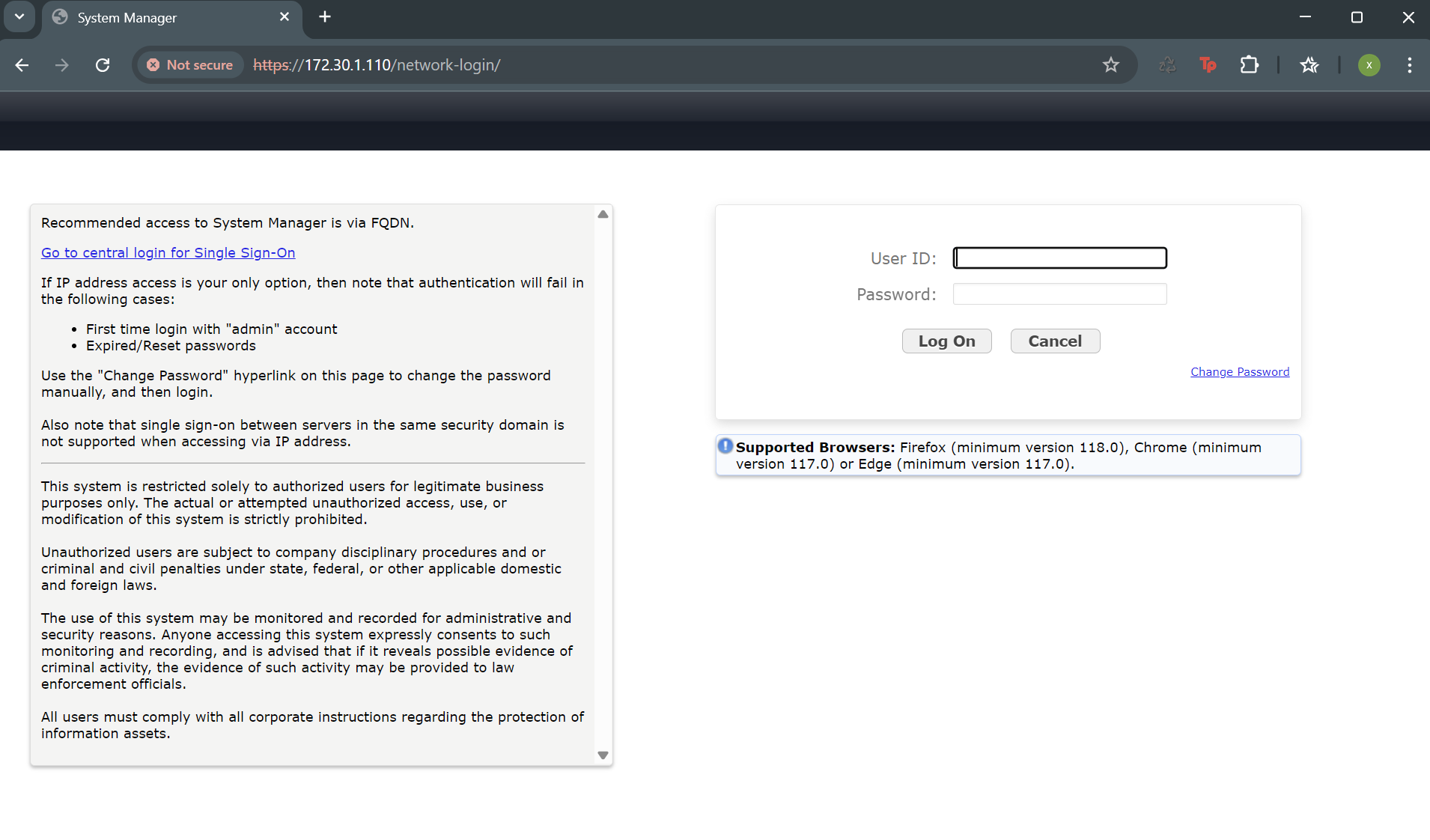
¶ Login ke SMGR pertama kali
Setelah selesai login ke SMGR melalui web console
default user saat pertama kali login:
user: admin
pass: admin123
¶ Change password admin
klik link change password, kemudian ganti password admin menjadi P@ssw0rd2025!@34
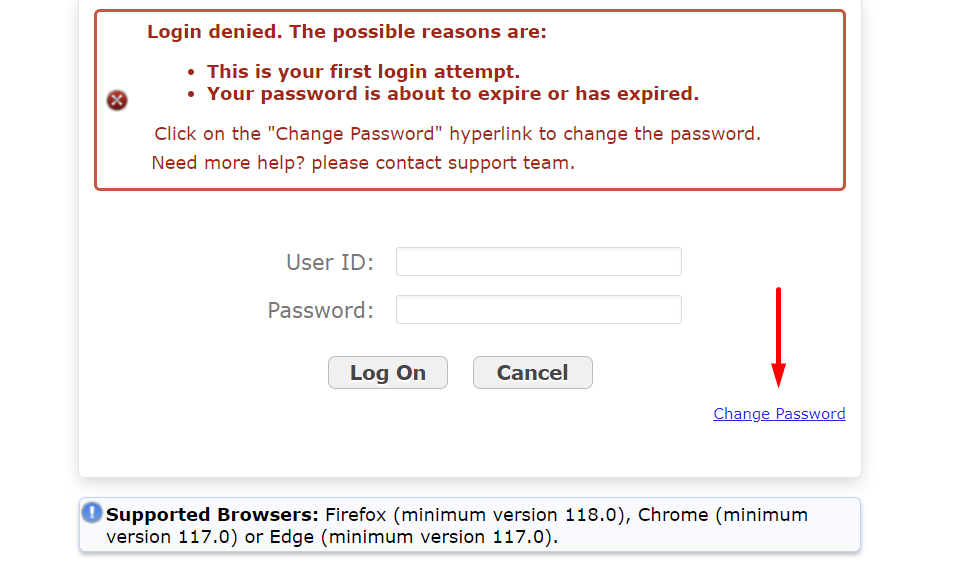
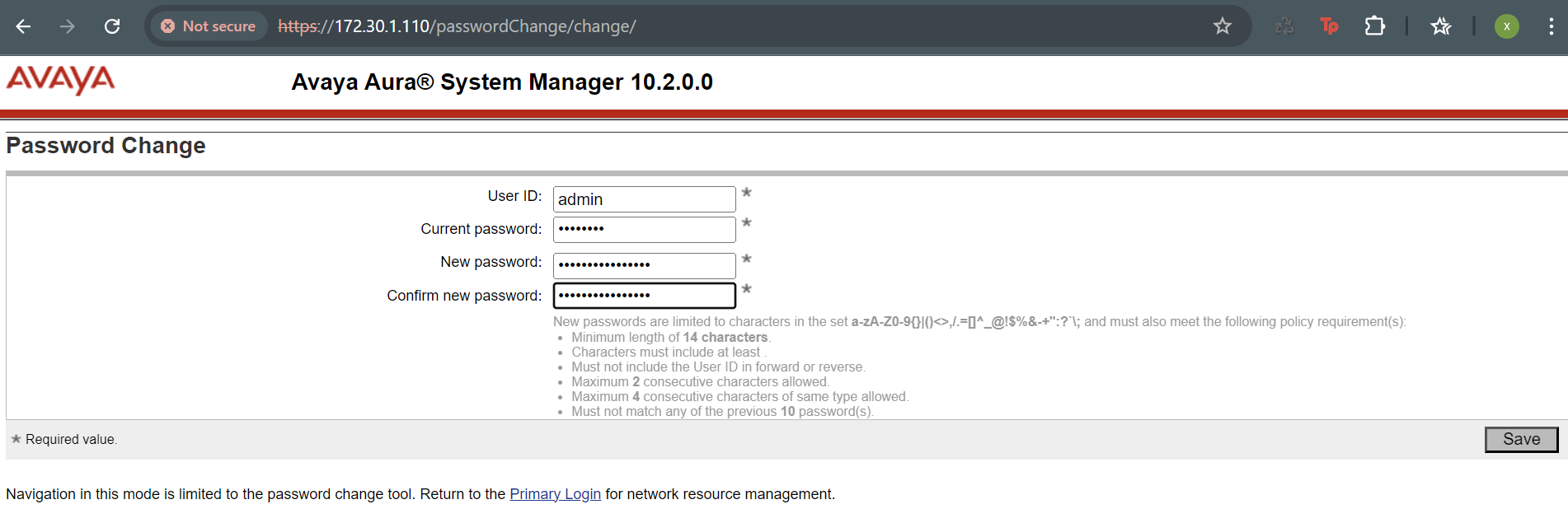
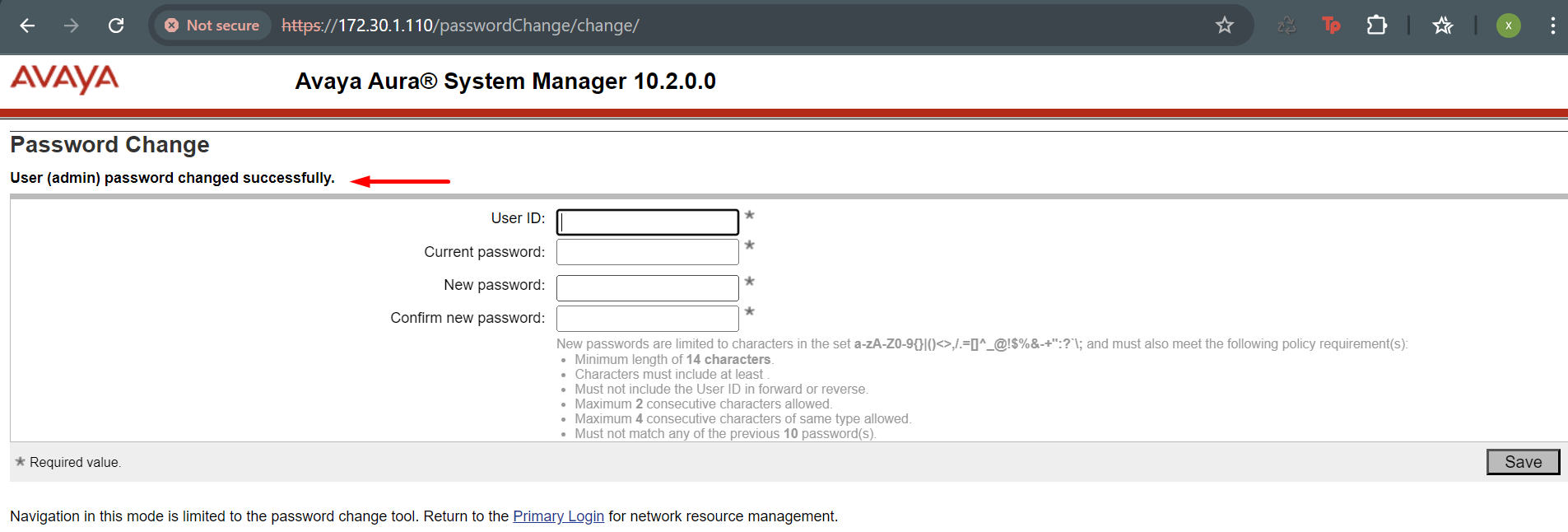
setelah itu klik link Primary Login di bawah halaman change password, kemudian login ke SMGR dengan user admin dan password yang baru
¶ Login dengan user admin setelah change password
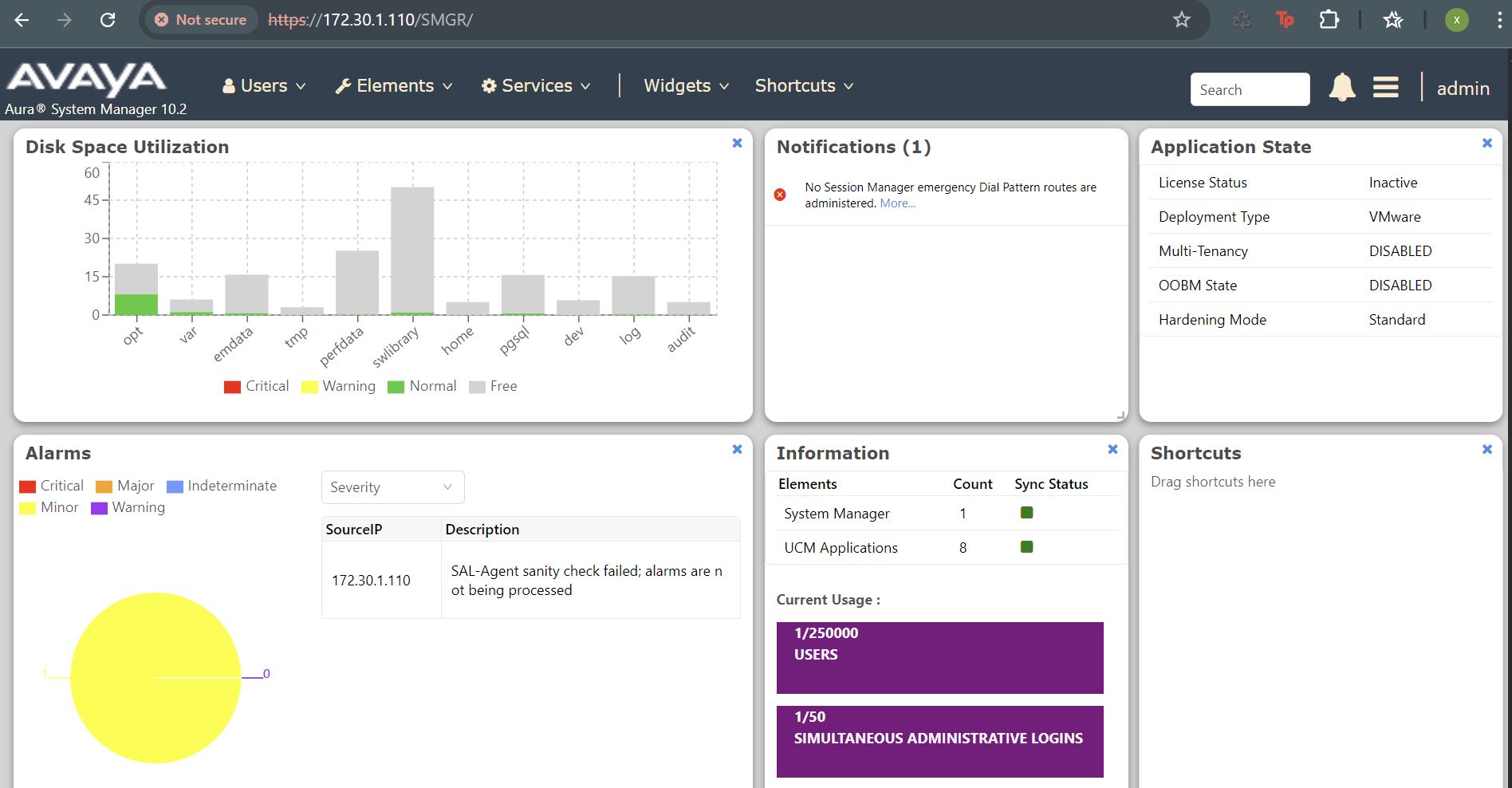
¶ Config SMGR
Setelah berhasil install SMGR, mari kita config. Yang perlu di perhatikan adalah:
- Change security policy
hal ini diperlukan, hasil yang bisa di capai antara lain:- supaya kita bisa membuat password yang lebih mudah untuk login ke SMGR
- merubah session timeout saat membuka SMGR
¶ Change security policy
Dari menu Users, pilih Administrator, lalu administrative users
masuk bagian security policy
¶ edit password policy, set:
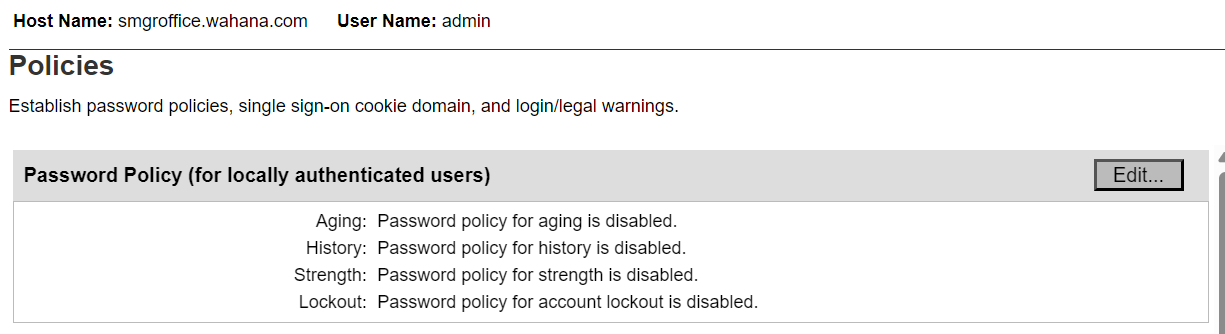
- Aging = disabled
- History = disabled
- Strength = disabled
- LockOut = disabled
¶ edit session policy, set:

- Maximum idle time = 120 menit
¶ change password admin
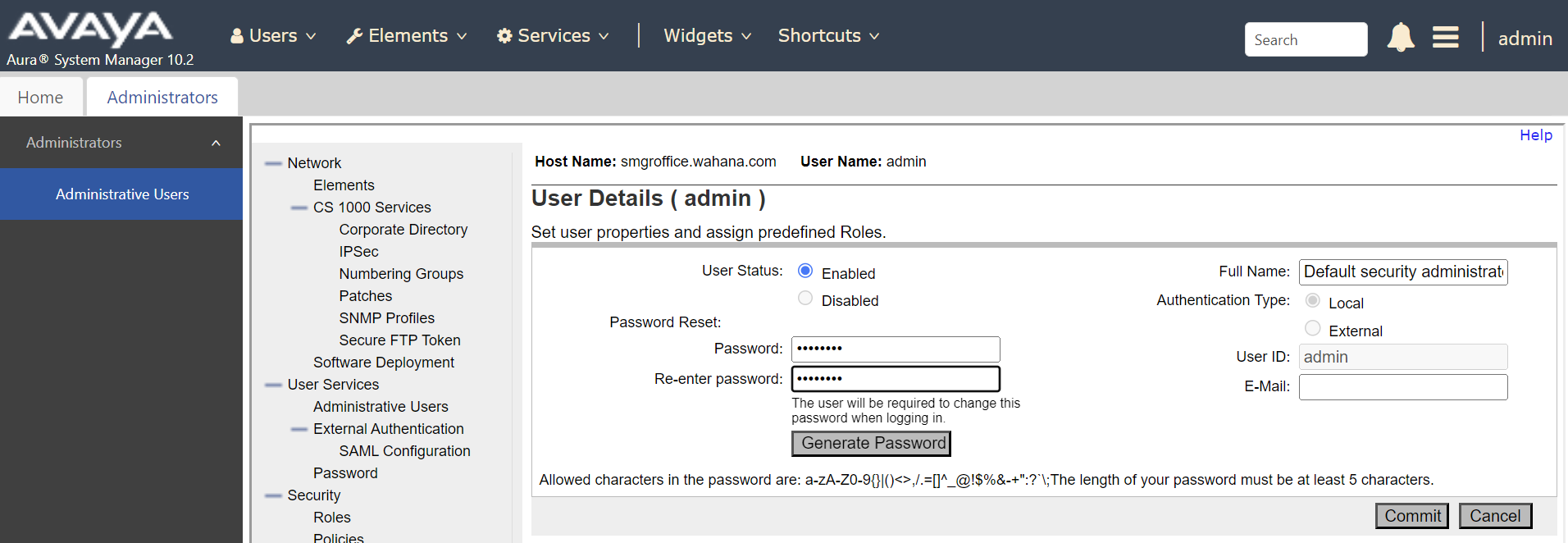
dari menu users, administrative users, klik user id admin, kemudian change password admin menjadi P@ssw0rd
klik commit, kemudian logout dan login kembali dengan password yang baru
akan ada dialog password expired, klik change password, masukkan password sekarang yaitu P@ssw0rd kemudian di new password masukkan password yang sama yaitu P@ssw0rd
Hal ini mungkin di lakukan karena sebelum nya security policy
Password Historysudah di disable